code.ACE
AI/ML Accelerator Co-design Environment — from CPU baselines to hardware co-design.

Overview
code.ACE is a practice-oriented project for exploring GEMV (General Matrix-Vector Multiplication) acceleration through comprehensive SW/HW co-design. It is designed both as a learning companion for computer architecture courses and as a foundation for accelerator co-design experiments involving optimization techniques and custom hardware.
The project focuses on:
- Building a reproducible software/hardware stack for performance analysis based on the Roofline model.
- Evaluating the impact of modern acceleration techniques like quantization (INT8) and structured sparsity (2:4).
- Understanding design trade-offs between CPU baselines, tiled kernels, and systolic-array models.
- Producing benchmarks and correctness tests for portfolio and research use.
Layered Architecture
The project is designed around a “Contract”-based architecture to ensure a clean separation of concerns between layers. This modular design allows for independent development and testing of the tensor library, backend implementations, and GEMV algorithms.
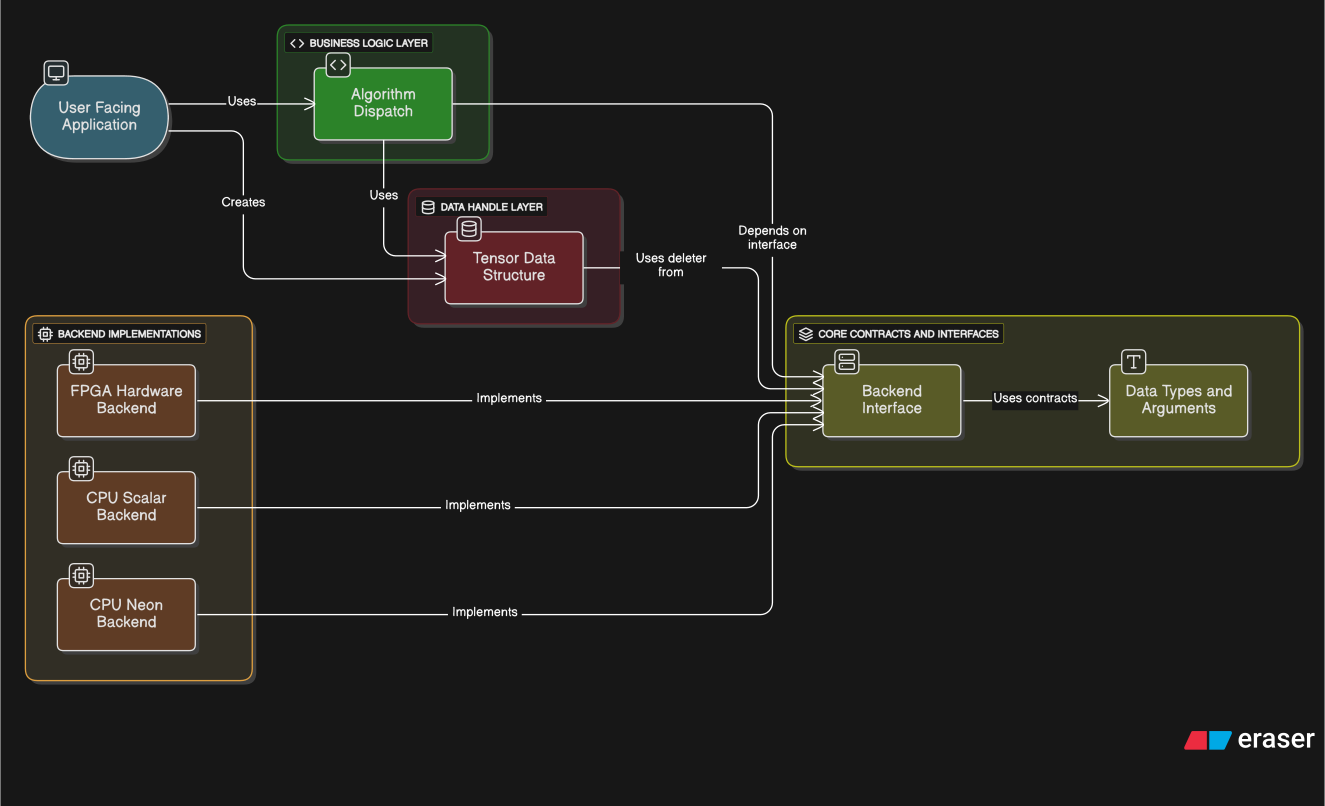
code.ACE Architecture Details
1. User Facing Application Layer
- Code:
src/app/main.cpp - Role: The program’s entry point and overall orchestrator.
- Description: This is the only layer that interacts directly with the user. It parses command-line arguments (e.g.,
--backend=hw.fpga) to decide which technology to use. It requests the creation of a backend from theBackend Factory, createsTensorobjects to prepare data, and finally commands theAlgorithm Dispatchto start the GEMV operation.
2. Business Logic Layer (Algorithm)
- Role: The brain of the project, responsible for the core logic and policy decisions of the GEMV operation.
Internal Node: Algorithm Dispatch
- Code:
src/alg/gemv_dispatch.cpp - Role: A middle manager and translator.
- Description: It receives high-level
Tensorobjects from theApplication. Based on the information in these objects, it creates (translates into) a low-level, standardized work order (GemvArgs) that theBackendcan understand. It then directs theBackendto perform the task via theBackend Interface. If theBackendreports that it cannot handle the task (by returningfalse), this component is also responsible for executing a fallback to a software kernel (e.g.,gemv_tiled.cpp).
3. Data Handle Layer
- Role: Encapsulates the actual data and its metadata for safe and convenient management.
Internal Node: Tensor Data Structure
- Code:
include/tensor/tensor.hpp - Role: A safe ‘handle’ to the data.
- Description: The
Tensorclass does not allocate memory itself. Instead, it holds a pointer to a block of memory allocated by aBackend, along with its specifications (shape, stride). Its most critical role is managing the memory’s lifecycle through the RAII (Resource Acquisition Is Initialization) pattern. When aTensorobject is destroyed, it automatically calls thedeleterfunction it received from theBackend, fundamentally preventing memory leaks.
4. Core Contracts and Interfaces
- Role: The ‘constitution’ of the project. It defines the fundamental rules and communication methods that all layers must adhere to.
Internal Node: Backend Interface
- Code:
include/core/backend.hpp(theIBackendabstract class) - Role: The master blueprint that defines the ‘qualifications’ for all backend implementations.
- Description: It defines a list of functions (
allocate,deallocate,gemv, etc.) that all backends must implement, using pure virtual functions. TheAlgorithmlayer depends only on this interface, allowing it to request operations in the same way, regardless of whether the actual implementation is CPU or FPGA.
Internal Node: Data Types and Arguments
- Code:
include/core/types.hpp - Role: The ‘common dictionary’ used by all layers.
- Description: It defines basic terms like
DType(data type) andMathOp(math operation). It also defines the core communication tool betweenAlgorithmandBackend: theGemvArgsstruct. This allows them to exchange information smoothly without knowing each other’s internal details.
5. Backend Implementations Layer
- Role: The ‘specialist engineers’. These are the concrete codes that perform the actual low-level work based on the
Corelayer’s blueprint (IBackend).
Internal Node: CPU Scalar Backend, etc.
- Code:
src/backend/cpu_scalar/,src/backend/cpu_neon/,src/backend/hw_fpga/, etc. - Role: Implementations of the
IBackendinterface. - Description:
-
CPU Scalar: The baseline backend that implements the most basic functionality using only the standard C++ library. -
CPU Neon: An optimized backend that uses NEON SIMD technology for ARM processors to accelerate thegemvfunction. -
FPGA Hardware: A backend containing code that communicates with actual hardware. When itsgemvfunction is called, it sends control signals to the FPGA via the AXI-Lite bus and transfers data via DMA.
-
Project Roadmap
The project is structured in four sequential phases, progressing from fundamental software concepts to a final hardware implementation.
- Phase 1: Software Kernels (Practice)
- Implement baseline GEMV kernels (Naive, Tiled/Blocking) in pure software to establish correctness and a performance reference.
- Phase 2: CPU Optimization
- Develop CPU-specific backends using SIMD intrinsics (Arm NEON, x86 AVX) to optimize the software kernels.
- Phase 3: Accelerator Modeling
- Build a cycle-approximate software model of a systolic array to understand its dataflow and performance characteristics without designing hardware.
- Phase 4: FPGA Co-Design (Hardware)
- Design, implement, and verify a complete INT8, 8x8 Output-Stationary Systolic Array accelerator on an FPGA, managed by an AXI-based host interface.
Build & Run
The project includes a simple build script and a command-line benchmark runner for standardized testing. Below is an example of running an INT8 benchmark with 2:4 structured sparsity.
# Build the project (default: cpu.scalar backend)
bash scripts/build.sh

# Run an INT8 benchmark with 2:4 structured sparsity
./build/ace_app --backend=cpu.scalar --kernel=sw.tiled \
    --dtype=i8 --math=Int8xInt8_To_Int32 --sparsity=block2_4 \
    --M=4096 --N=4096 --runs=30 --warmup=5